Job management for contractors and trades

Run your jobs, crews and stock from one place.

Plan each job, take materials out of real stock, collect timesheets from the field and see what every project is costing you while there's still time to do something about it.

  • 14 days free
  • No credit card to start
  • Prices in Canadian dollars
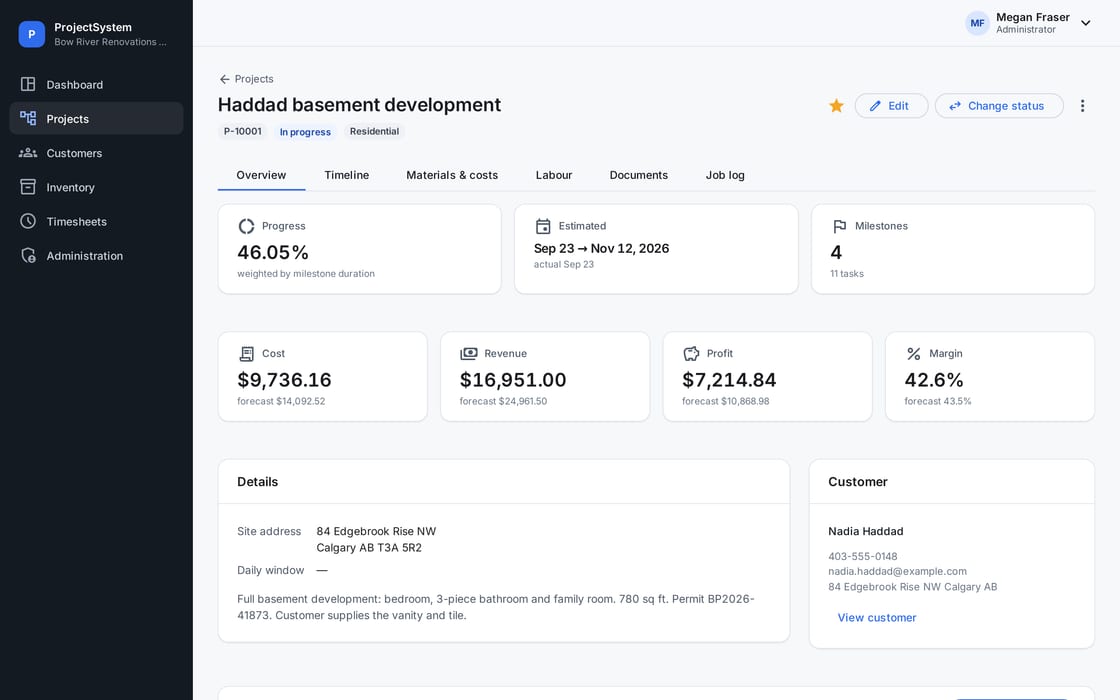
A project in ProjectSystem: progress, estimated dates, milestone count, and cost, revenue, profit and margin against forecast for a basement development.
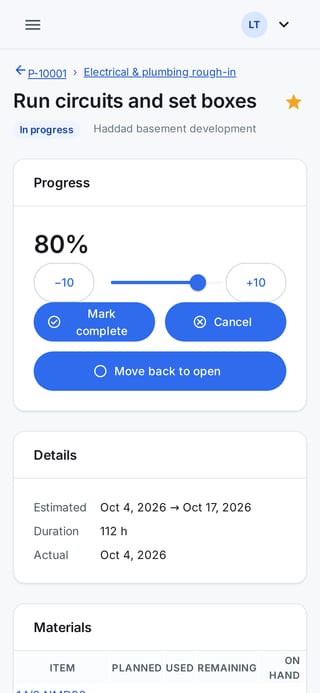
The same job's task on a phone: progress at 80 percent with buttons to mark it complete.

One system, three jobs

Built for the people who actually run the work

Owners, the office and the crew each get what they need, and nobody sees what they shouldn't.

For owners

Know which jobs make money

Cost, revenue, profit and margin for every project, milestone and task, with actuals next to the estimate.

  • Materials, labour and other costs roll up on their own
  • Late starts and overdue work flagged
  • An audit log of every change

For the office

Less chasing, fewer spreadsheets

Customers, projects, stock and timesheets live in one place instead of five, so the answer is a search away.

  • Weekly timesheets with approvals
  • Stock levels with reorder alerts
  • Documents filed against the job

For field crews

Their day, on their phone

Crews open the job, update progress, log what happened with photos and enter their hours. Prices and pay rates stay hidden.

  • Works in the phone's browser, nothing to install
  • Take a photo straight into the job log
  • Star the jobs they're on for quick access

What it does

From the first stud to the final walkthrough

See where every job stands

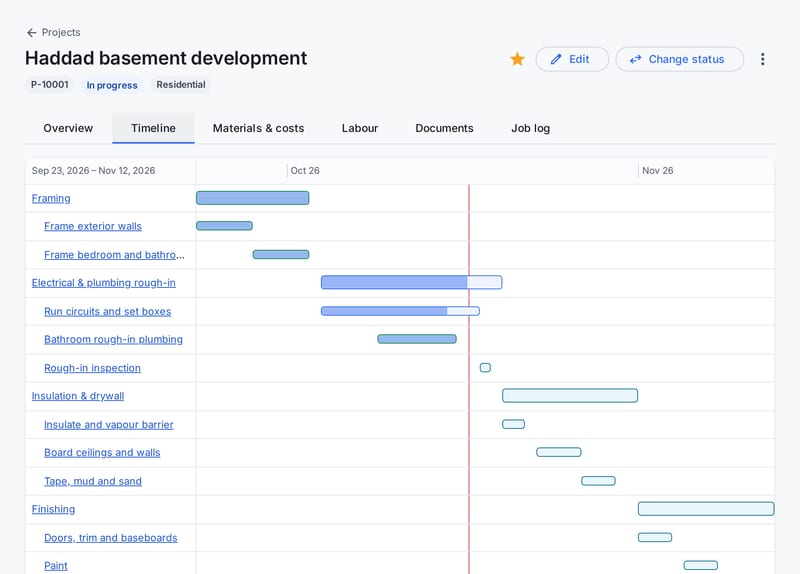
Break a project into milestones and tasks with estimated dates and hours. Progress rolls up as the crew updates it, and the timeline shows what's late before the customer calls.

  • One status workflow from open to complete, enforced for everyone
  • Duration-weighted progress for each milestone and the whole job
  • Late-start and overdue flags on the timeline
A project timeline with milestones and tasks as bars, finished work in green and a red line marking today.

Materials that come out of real stock

Plan the materials for each task, then record what the crew actually used. It comes off the shelf and goes onto the job at cost, so your stock count and your job costs agree.

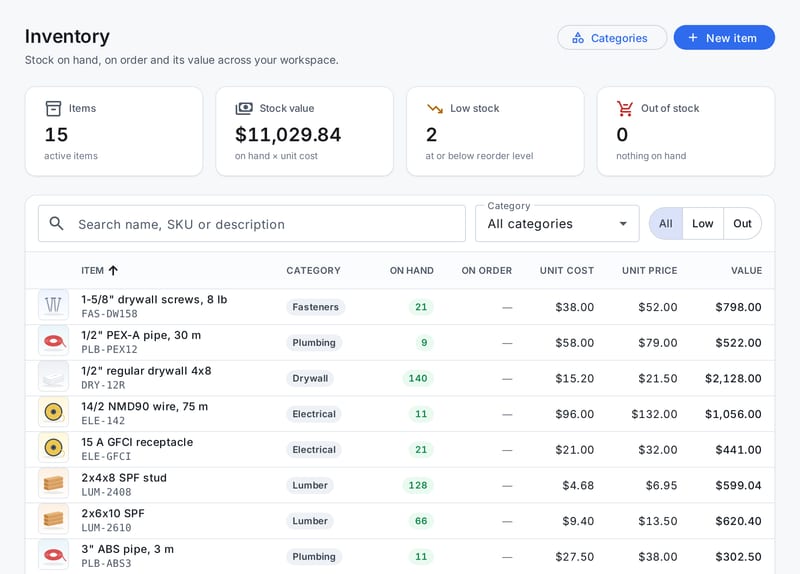
  • On-hand worked out from a ledger of receipts, usage and adjustments
  • Stock on order, reorder levels and low-stock alerts
  • Unused material goes back into stock
The inventory list: items with photos, SKUs, categories, on-hand quantities, unit cost and price, and total stock value.

Timesheets that turn into job costs

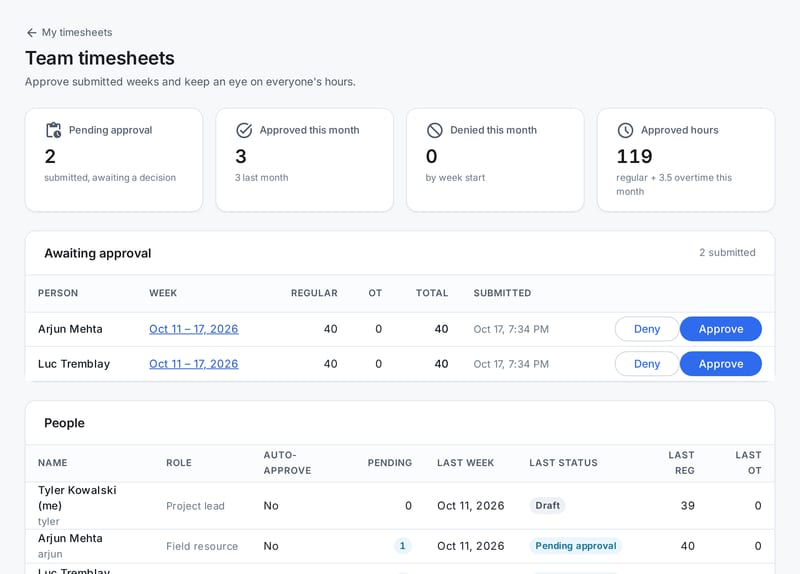
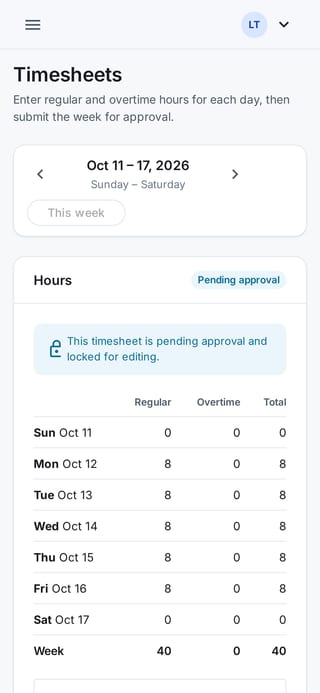
Crews fill in their week on a phone and submit it. Their lead approves or sends it back with a note, and the hours charged to each milestone show up on the job at the right rate.

  • Regular and overtime hours, Sunday to Saturday
  • Submitted weeks lock, so approved hours can't drift
  • Approved labour counts as actual cost, pending hours as forecast
Team timesheets for a project lead: two weeks waiting for approval with Approve and Deny buttons, and each person's latest week.
A field worker's week on a phone, eight hours a day Monday to Friday, pending approval.

Know the margin while you can still change it

Materials, approved labour, subcontractors, equipment and permits add up as they happen. Every project, milestone and task shows actual and forecast cost, revenue, profit and margin.

  • Estimates per milestone and task to measure against
  • Receipts and invoices attached to each cost line
  • Money stays with the roles that need it
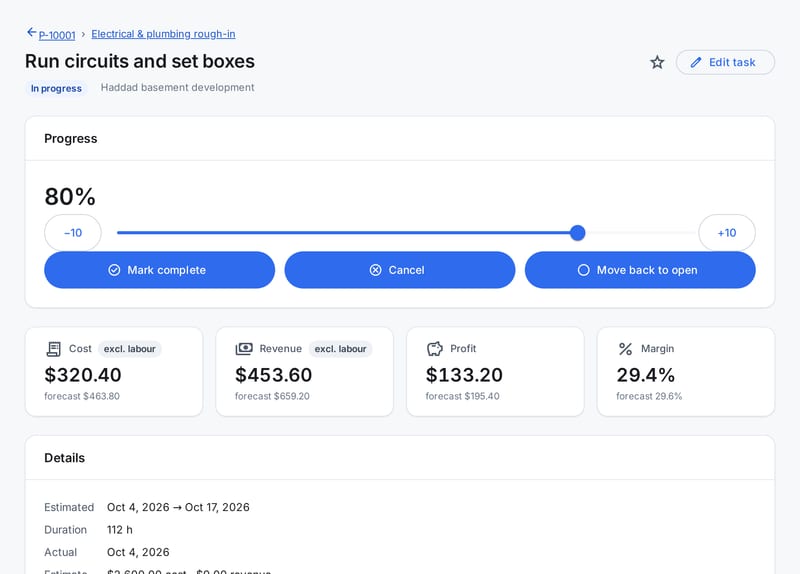
A task page showing progress and cost, revenue, profit and margin, each with its forecast.

And the things you'd otherwise keep in a binder

Job logs with photos

Site notes on the project, a milestone or a task, with up to 20 photos or files each.

Documents

Drawings, permits and contracts filed against the job, in categories you choose.

Customers

Contacts, site and company addresses, notes and every project you've done for them.

Five roles

Field, lead, office, editor and admin, checked on the server for every request.

Audit log

Who changed what and when, including sign-ins. Entries can't be edited.

Made for Canada

Canadian English, prices in CAD, and dates on Mountain Time out of the box.

Getting started

Up and running this afternoon

  1. Create your workspace

    Pick a name for your company's workspace and confirm your email. It takes a couple of minutes.

  2. Add your crew and your stock

    Add your team with the right role for each person, add your customers and the materials you keep on hand.

  3. Run a real job through it

    Set up a project, let the crew update it from site, approve the week's hours and watch the numbers fill in.

Pricing

One plan with everything. Pay per user.

The price per user drops as your team grows. No setup fees, no contract, no feature tiers.

  • 1–10 users$24.99per user / month
  • 11–100 users$19.99per user / month
  • 101+ users$17.99per user / month

For example, 12 users: 10 × $24.99 + 2 × $19.99 = $289.88 a month. Billed monthly in CAD.

Questions people ask first

How does the free trial work?

Sign up, confirm your email address and your workspace is ready. You get 14 days with every feature and as much real work as you want to put through it. We don't ask for a credit card to start.

What happens when the trial ends?

If you haven't subscribed, your workspace becomes read-only. Your team can still sign in, look up projects, customers, stock and timesheets, and download documents and photos. They just can't change anything.

An admin can subscribe at any time, and editing comes straight back. If the workspace stays read-only for 30 days, it may be permanently deleted; we'll email your admins the date in advance.

How is the monthly price worked out?

You pay per user, per month, and the price per user drops as your team grows. Each user is charged at the rate of the band they fall in, like tax brackets:

  • Users 1 to 10: $24.99 each
  • Users 11 to 100: $19.99 each
  • Every user after 100: $17.99 each

So 12 users cost 10 × $24.99 + 2 × $19.99 = $289.88 a month. The pricing calculator works it out for any team size.

Who is ProjectSystem for?

Contractors and trades who run jobs with crews in the field and someone keeping things together in the office: renovation and general contractors, electrical, plumbing and mechanical, framing, drywall, landscaping and similar outfits. It works for a two-person shop and for teams with several crews.

Can field crews use it on their phones?

Yes. ProjectSystem runs in the phone's web browser, so there's no app to install. Crews see their projects and tasks, update progress, write job log entries with photos, upload documents and enter their weekly timesheet.

Field users never see costs, prices or pay rates.

Where is my data stored?

On Google Cloud in the us-east1 region, which is in the United States. We don't offer hosting in Canada yet. The privacy policy lists every service provider that handles your data.

Try it on your next job

Set up your workspace in a few minutes, add your crew and run a real job through it. If it doesn't fit, walk away: there's nothing to cancel.

  • 14 days free
  • No credit card
  • Every feature included